
Effective teaching isn’t about being a perfect instructor. It’s about making thoughtful choices that help students succeed.
VANS Shoes Marketing Campaign – Example
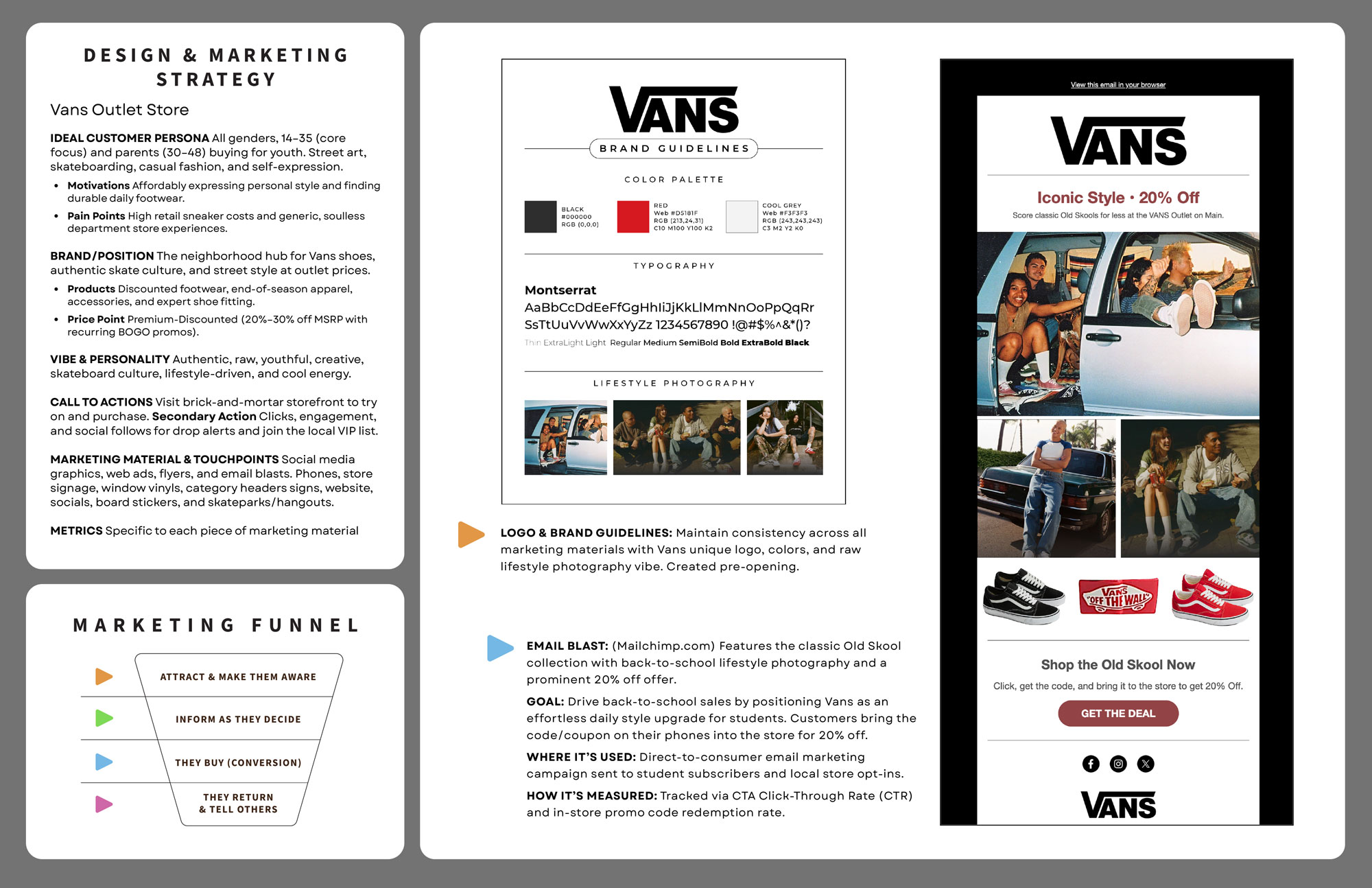
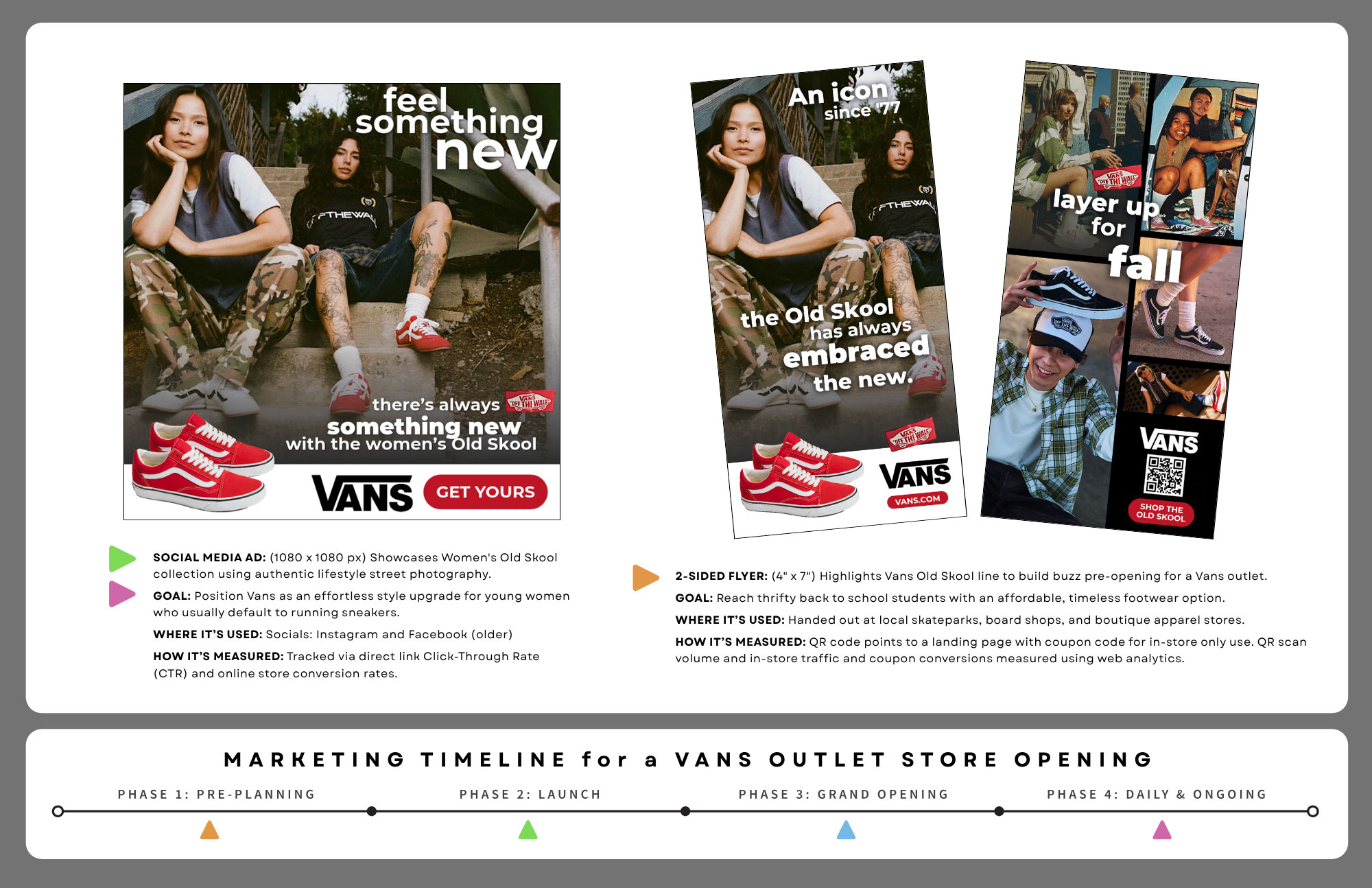
Here’s an example of how these five simple strategies are used in my Design Fundamentals class as students create and design a Marketing Campaign from the ground up. The VANS example below is meant to inspire students and give them a concrete sense of the project’s expectations while allowing them to retain some choice and flexibility.
Several guided steps and mini-projects combine to create a portfolio-quality, client-ready marketing campaign that helps them get their first job and demonstrate their in-depth understanding of the fusion of graphic design and marketing.
1. Make It Real & Keep Students Motivated
(Adult Learning & Self-Determination Theory)
Connect lessons to real jobs and practical challenges. Help students understand why they’re learning something and give them opportunities to make choices and experience success.
What it means for teachers
- Students are more motivated when they understand why they’re learning something and how it connects to real jobs.
- Real-world projects help students see the value of what they’re learning.
- Meaningful choices give students a sense of ownership over their work.
- Small successes build confidence and encourage students to keep improving.
How it is used in the VANS Marketing Campaign Project
- Real-world work: Students act like working graphic designers. They develop a marketing strategy, follow brand guidelines, and connect their designs to a marketing funnel and measurable goals.
- Career connections: Course materials include real graphic design job postings that show how employers use marketing, branding, and design skills.
- Start with familiar examples: Students examine social media graphics from brands they know and discuss their messages, audiences, and branding.
- Student choice: Students choose their own client and select three marketing pieces to create for their campaign.
- Portfolio-ready work: Students organize their campaign and design decisions into a two-page portfolio spread they can show potential employers.
2. Don’t Overload Their Brains
(Cognitive Load Theory & Multimedia Learning)
Break complex projects into manageable steps. Use clear instructions, helpful visuals, and completed examples so students can focus on learning one skill at a time.
What it means for teachers
- Beginners can only process a limited amount of new information at once.
- Breaking complicated assignments into smaller steps makes learning more manageable.
- Pairing short written instructions with relevant visuals can make unfamiliar processes easier to understand.
- Showing completed examples helps students understand what they’re working toward.
- Students benefit from learning foundational skills before moving on to more complicated tasks.
How it is used in the VANS Marketing Campaign Project
- Bite-sized project steps: The larger campaign is broken into manageable parts: develop a marketing strategy, establish brand guidelines, create an initial social media graphic, and then design two additional marketing pieces.
- Build from one piece to the whole campaign: Students first learn to create an individual design before combining multiple pieces into a coordinated marketing campaign.
- Visual instructions: Assignment pages include clear instructions, checklists, and visual examples to help students understand each part of the project.
- Show levels of quality: The “4 Levels of Graded Design Work” provides visual examples of different levels of design quality, helping students understand the difference between basic work and client-ready work.
- Finished examples: Students see a completed VANS campaign example and past student work before creating their own campaigns.
- Beginner-friendly tools: Students can start with Canva rather than feeling overwhelmed by advanced software before they understand basic design principles.
3. Show Them How, Then Let Them Try
(Cognitive Apprenticeship & Guided Practice)
Demonstrate how to do the work, let students practice with guidance, and gradually give them more responsibility as their skills develop.
What it means for teachers
- Beginners benefit from watching someone demonstrate a skill and explain the decisions behind it.
- Guided practice gives students a chance to try new techniques while help is available.
- Examples, templates, and instructions provide support while students develop confidence.
- As students gain experience, teachers can gradually step back and let them work more independently.
How it is used in the VANS Marketing Campaign Project
- I do (Modeling): The instructor demonstrates how to develop campaign materials and build designs using Canva. Short video walkthroughs show students how to use important software features and complete common design tasks.
- We do (Guided Practice): Students follow demonstrations and practice design techniques. Downloadable assets, brand guideline templates, and a two-page portfolio layout template provide support.
- Show complete workflows: Students learn how to set up a document, upload assets, create layouts, arrange design elements, and export finished designs.
- Connect software tools: Students can learn to create custom vector artwork in Illustrator and import it into Canva when they need additional design capabilities.
- You do (Independent Application): Students use what they’ve learned to select their own marketing pieces and develop a unique campaign for their chosen client.
- Support when needed: Students can revisit video tutorials, written instructions, and examples or ask the instructor for individual help.
4. Make Learning Accessible to Everyone
(Universal Design for Learning – UDL)
Build flexibility into your teaching by providing different ways for students to access information, learn new skills, participate, and demonstrate what they know. Look at your existing lessons and add resources or teaching approaches where they could help remove learning barriers.
What it means for teachers
- Students don’t all process information or learn new skills in the same way. One teaching approach won’t work equally well for everyone.
- If you primarily lecture, consider adding visual examples, short tutorial videos, demonstrations, or written instructions so students have other ways to understand the material.
- If you demonstrate something in class, consider recording it so students can revisit the process when they need help or miss a step.
- Give students reasonable choices in how they approach assignments while still meeting the same learning goals.
- Look at your existing lessons and identify where students commonly struggle. Sometimes a new handout, video, example, checklist, or alternative explanation is all that’s needed to make learning easier.
- You don’t have to create everything at once. Start with one lesson or one learning barrier and gradually build a collection of helpful resources.
How it is used in the VANS Marketing Campaign Project
- Multiple ways to access instructions: Students can follow written, step-by-step website instructions, view visual design examples, and watch video demonstrations to learn Canva workflows and layout techniques.
- Flexible learning pace: Video tutorials allow students to pause, rewind, and revisit software techniques at their own pace.
- Multiple ways to learn: The project combines live instructor demonstrations, hands-on practice, visual examples, written instructions, and individual assistance.
- Reusable learning resources: Recorded demonstrations and written instructions allow students to revisit lessons independently, giving the instructor more time to help individuals.
- Individualized instruction: The instructor can demonstrate a technique again or show how it applies to a student’s particular project without changing the learning expectations.
- Flexible student expression: Students choose their own client or brand, select three marketing pieces to design (such as a flyer, web ad, or email), and can use Canva or Adobe Illustrator to create their work.
5. Keep Students Practicing, Improving & Moving Forward
(Active Learning, Formative Assessment & Solution-Focused Feedback)
Give students regular opportunities to apply what they’re learning, evaluate their progress, receive practical feedback, and make meaningful improvements.
What it means for teachers
- Students learn by actively applying new skills, not just listening to explanations or reading instructions.
- Checking work while students are still learning gives teachers opportunities to identify problems and provide help before the project is finished.
- Useful feedback identifies what is working and gives students practical suggestions for what they can try next.
- Showing students possible solutions can make feedback easier to understand and apply.
- Checklists help students monitor their own work and take responsibility for completing assignments.
- Revision gives students an opportunity to put feedback into practice and recognize their improvement.
How it is used in the VANS Marketing Campaign Project
- Apply, don’t just read: Students apply marketing funnel concepts and metrics directly to their own designs. They also explain their marketing and design decisions in their portfolio spread.
- Self-checklists: Assignment pages include clear checklists so students can review their own work, including file size, format, branding, and project requirements.
- Clear targets: The “4 Levels of Graded Design Work” shows students different levels of design quality so they understand what they’re working toward and how to improve.
- Multiple rounds of feedback: Students participate in two rounds of peer critiques and two rounds of instructor critiques while their designs are still in progress. This gives them multiple opportunities to evaluate and improve their work.
- Solution-focused progress critiques: The instructor reviews students’ designs as they develop, identifying strengths and areas for improvement. Feedback includes written comments, drawn suggestions, and possible design solutions directly on printed work.
- Practical next steps: Instead of simply telling students what is wrong, the instructor demonstrates possible ways to improve a design. Students can try those suggestions, make their own decisions, and see how the changes affect their work.
- Student ownership of revisions: Students review the feedback and decide which suggestions to apply. They learn to make their own design decisions rather than simply follow corrections.
- Make improvement visible: Students submit revised designs alongside their marked-up originals. The instructor can compare the work and see how students used feedback to improve.
- Learn from classmates: Group critiques give students opportunities to examine and discuss each other’s designs, recognize effective approaches, identify problems, and consider alternative solutions.
- Present and reflect: Students present their campaigns and explain their marketing strategies and design decisions, helping them think critically about the work they’ve created.
The Bigger Picture
The goal isn’t simply to tell students whether their work is good enough. It’s to help them understand what is working, recognize what could be better, and see practical ways to move forward.
When students regularly practice, receive useful feedback, try solutions, and recognize their progress, improvement becomes part of the learning process—not just something that happens after grading.